
How to Make a BOM: Template and Release Checks
Build a manufacturing BOM with a copyable template, a checked 40-enclosure example and practical rules for units, revisions, allowances and approval.


To make a BOM, define the finished item and quantity basis, list each component with its unit and revision, calculate a trial order, then approve the version used in production. Begin with the approved drawing or specification rather than a purchase list assembled from memory. In Optiwise, we connect the approved material structure with stock, production demand and the work still needing action.
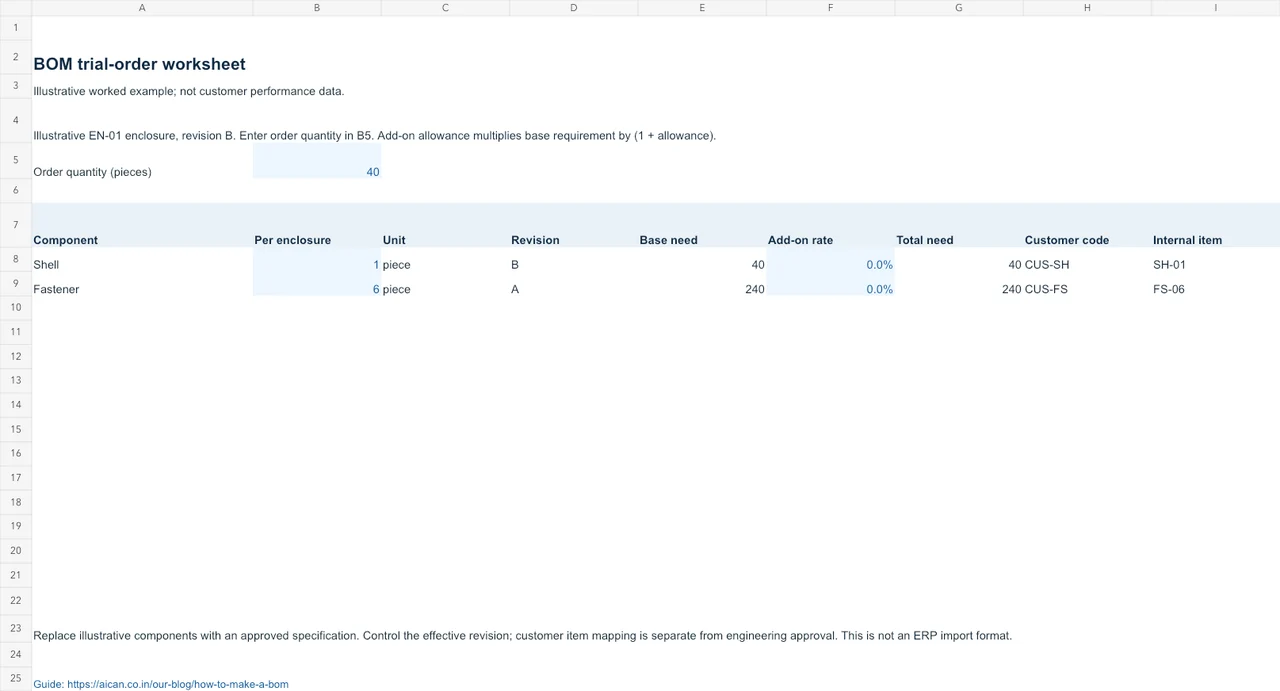
Download the BOM trial-order worksheet
BOM trial-order worksheet (Excel workbook) includes a worked example and a separate sheet for your inputs. Blue cells are editable; formula cells calculate the result. Replace the illustrative figures with your factory records.
A purchase list may include spare parts, minimum-order quantities and material for several jobs. The BOM describes the material required for its stated product and output quantity. Keep purchasing decisions and current stock in their own records so changing a supplier order does not silently change the product recipe.
Define the item and the BOM basis
Record the finished-item code, description, drawing revision, BOM revision and base output quantity. One assembly is a convenient basis for discrete components; a process recipe may use a stated batch quantity. Use the basis consistently before multiplying for a work order.
ERPNext's BOM documentation illustrates components, quantities and multi-level structures. Your ERP may organise operations differently, but stores still needs unambiguous material identity, quantity and unit.
Fill a component template from the approved specification
| Parent / basis | Component | Drawing or spec | Quantity | Unit | Check |
|---|---|---|---|---|---|
| EN-01 / 1 enclosure | SH-01 shell | Shell drawing B | 1 | piece | Correct finish and hole pattern |
| EN-01 / 1 enclosure | FS-06 fastener | Approved size and grade | 6 | piece | Do not merge different lengths under one code |
For 40 enclosures the base requirement is 40 shells and 240 fasteners. These are illustrative inputs, not a customer's design or an approved engineering specification. A factory should enter its own controlled specifications and have the responsible engineer approve them.
| Field | Entry to complete | Reviewer |
|---|---|---|
| Finished item / base output | Item code; quantity; unit | Engineering |
| Drawing and BOM revision | Approved source; effective version | Engineering |
| Component identity | Code; description; specification | Engineering / stores |
| Component requirement | Quantity per basis; unit; calculation | Planning |
| Allowance or substitute | Approved rule and condition, if applicable | Authorised technical owner |
| Release evidence | Approval; date; affected orders | Named release owner |
Handle units, subassemblies and allowances deliberately
Give a subassembly its own BOM when it is made or stocked as a controlled item. Check whether the production requirement will use existing subassembly stock or manufacture more. Do not add both a stocked subassembly and all its underlying components to the same gross purchase requirement.
If a bar is purchased by weight but cut by length, document the conversion inputs and where actual measurements replace an estimate. Keep consumables and packaging explicit when they belong in the production requirement. A line called “miscellaneous material” cannot tell stores what to issue.
Enter scrap or yield allowances separately from base quantities, with a stated calculation rule and approval. An allowance added to input is not automatically equivalent to a percentage loss of input. If the rule is unclear, resolve it before releasing the BOM.
Recalculate a trial order before release
- Have a second person calculate one order from the base quantity and component lines.
- Check that units agree across purchase, stores and production.
- Compare the template with the approved drawing, including small components and packaging.
- Verify any substitutes and determine when they are permitted.
- Issue the trial material and reconcile unused returns, good output and recorded losses.
A difference after the trial can come from a wrong quantity, missed movement or production loss. Investigate the record before changing the standard BOM to make the figures match.
Release a version without changing open work silently
Keep the previous revision and identify the orders, batches or dates to which the new revision applies. Record what happens to material already issued and work already started. A new drawing received by email still needs an approved effective rule and communication to the affected teams.
Use the BOM definition and revision guide for product-structure examples, and the production-planning worksheet to connect the released BOM with material and capacity. In an Optiwise production demo, ask to trace your template into an open job and show the effect of an approved revision.
Questions from manufacturing teams
Can I make the first BOM in a spreadsheet?
Yes. Use controlled item codes, quantities, units and revisions, and agree who can change the released version. Validate the structure and calculations before importing it into an ERP.
Should current stock appear in the BOM?
The BOM records the gross requirement for its stated output. Stock availability, reservations and expected receipts belong in planning records used to calculate the net material need.
Who should approve a manufacturing BOM?
Assign approval to the people responsible for the product specification and its production use. Engineering, planning and stores should check the fields relevant to their work before release.
Move the approved structure into production
In Optiwise, we keep the BOM separate from routing, so material requirements and work stages remain clear. Nested BOMs, subassemblies, byproducts and scrap can form part of the product structure. Smart Suggest checks demand against available stock, open purchases and existing production before you create more work.
Keep the customer’s item reference beside your internal item code when their files use different names. The workbook includes that cross-reference. A change to the customer code does not authorise a different component or engineering revision.
Use your trial BOM in the next job
Bring the approved drawing, its revision, a 40-unit trial requirement and the component identities. Follow the requirement into material issue and the production record. Explore the Optiwise workflow or book a factory walkthrough. We charge ₹0 for implementation. Subscription, optional add-ons and IoT hardware are separate.

Related Posts

Kanban System | Optiwise
Learn how a Kanban system works in manufacturing, where it helps, where it fails, and how Optiwise connects Kanban signals with inventory, purchase, and production planning.
12 Jun 2026Read more →Erp In Operations Management | Optiwise
Learn how ERP improves operations management by connecting planning, inventory, purchase, production, quality, dispatch, finance, and reporting.
12 Jun 2026Read more →ERP for FMCG Companies in India
A practical guide to ERP for FMCG companies in India, covering distributor orders, batch tracking, expiry, inventory, production, schemes, costing, and reporting.
11 Jun 2026Read more →
Optiwise, Odoo, Acumatica and Business Central for Manufacturing
Compare manufacturing workflows in Optiwise, Odoo, Acumatica and Dynamics 365 Business Central. See what your factory can run in Optiwise.
11 Jun 2026Read more →