
Reorder Level: Formula, Example and Spreadsheet Guide
Calculate reorder level with a factory example and spreadsheet formulas. Understand safety stock, lead time, open orders and when to review replenishment.


Reorder level, also called reorder point, is the inventory threshold that triggers replenishment. A common starting formula is average daily usage × replenishment lead time + safety stock. It answers when to reorder; the quantity to purchase is a separate decision. In Optiwise, we connect store-specific thresholds with stock alerts, purchase indents and open buying work, so you can review the requirement before ordering again.
Download the reorder review calculator
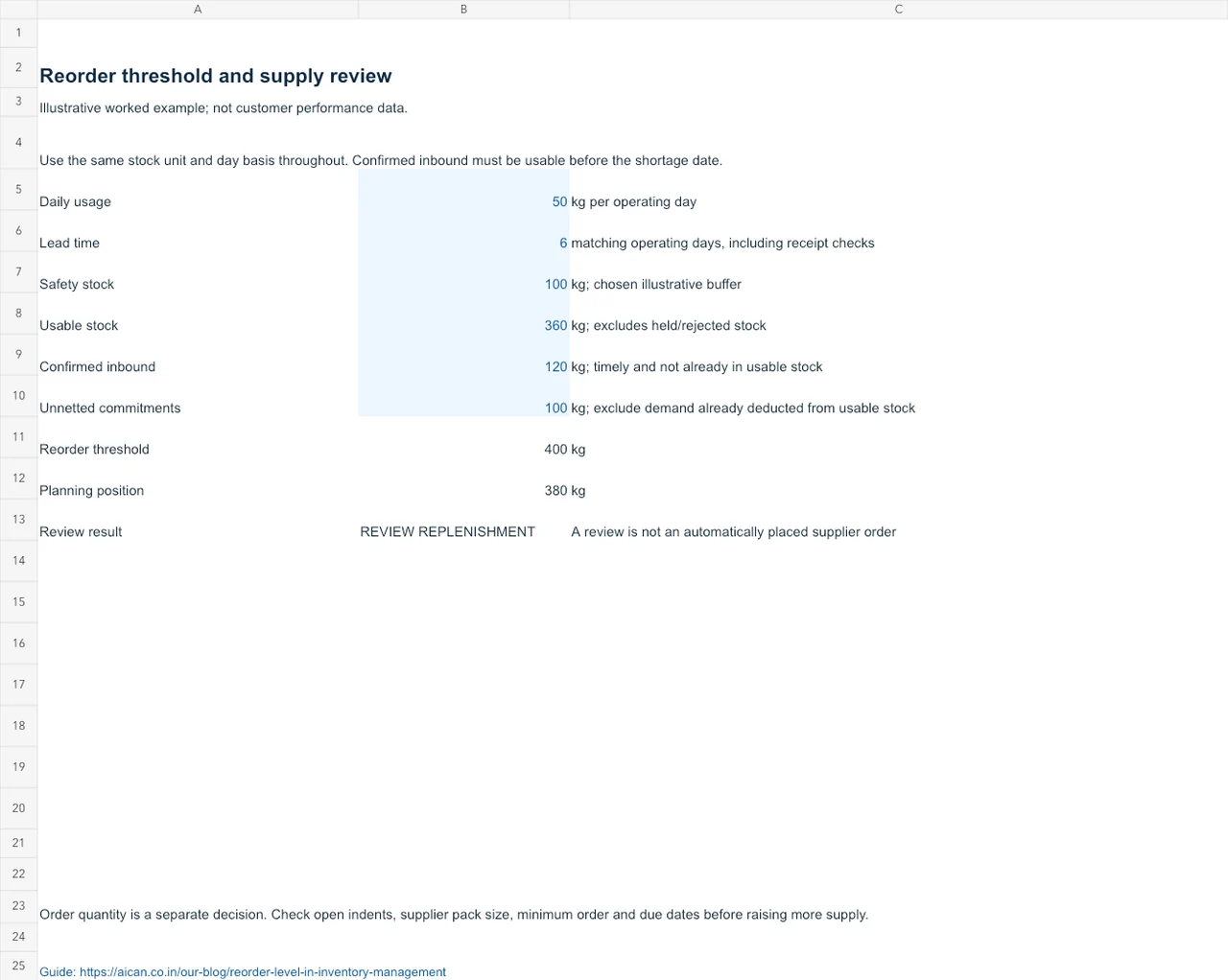
reorder review calculator (Excel workbook) includes a worked example and a separate sheet for your inputs. Blue cells are editable; formula cells calculate the result. Replace the illustrative figures with your factory records.
Reorder level formula and units
Reorder level = average daily usage × lead time in days + safety stock. Usage and safety stock must use the same inventory unit, such as kilograms, litres or pieces. Usage and lead time must also share a calendar: do not combine consumption per working day with an unexplained calendar-day delivery period.
Zoho's reorder-point guide describes this lead-time-demand-plus-buffer formula. It is a starting policy, not a guarantee against shortages. Supplier delays, changing demand and inaccurate stock records can still cause a stockout.
| Input | What to measure | Factory check |
|---|---|---|
| Average daily usage | Consumption over a representative period divided by the corresponding days | Use actual issues/consumption; investigate missing entries and exceptional orders. |
| Lead time | Time from replenishment release to stock being usable | Include relevant supplier, transport, receiving and inspection time. |
| Safety stock | An explicitly chosen buffer for uncertainty | Record the reason, owner and review date; do not hide the buffer in several inputs. |
Worked example: 400 kg reorder level
Illustrative example: a factory consumes 50 kg of a material per operating day. Replenishment takes six matching operating days, including receiving checks. The planner has selected a 100 kg buffer for this example.
50 kg/day × 6 days + 100 kg = 400 kg. Under a simple policy with no open receipts, reservations or unusual near-term demand, the replenishment alert should trigger when the monitored quantity reaches 400 kg. The expected six-day consumption is 300 kg; the remaining 100 kg is the buffer.
The buffer is an assumption, not a calculated optimum. If lead time increases to eight days with the same usage and buffer, the threshold becomes 50 × 8 + 100 = 500 kg. If usage rises to 65 kg/day and lead time remains six days, it becomes 65 × 6 + 100 = 490 kg.
| Scenario | Usage | Lead time | Buffer | Threshold |
|---|---|---|---|---|
| Starting policy | 50 kg/day | 6 days | 100 kg | 400 kg |
| Supplier delay | 50 kg/day | 8 days | 100 kg | 500 kg |
| Higher consumption | 65 kg/day | 6 days | 100 kg | 490 kg |
A spreadsheet layout you can copy
Use one row per item and warehouse where replenishment policies differ. The columns below keep assumptions visible. The proposed planning-position calculation is deliberately simplified; reconcile it with the definitions and dates used in your inventory system.
| Column | Heading | Example or formula in row 2 |
|---|---|---|
| A | Item / warehouse | MAT-01 / Main stores |
| B | Average daily usage | 50 |
| C | Lead time, matching days | 6 |
| D | Safety stock | 100 |
| E | Reorder level | =B2*C2+D2 |
| F | Usable on-hand quantity | 360 |
| G | Confirmed inbound quantity within the relevant horizon | 120 |
| H | Relevant committed quantity not already netted from F | 100 |
| I | Simplified planning position | =F2+G2-H2 |
| J | Review alert | =IF(I2<=E2,"REVIEW REPLENISHMENT","MONITOR") |
In this example the planning position is 360 + 120 − 100 = 380 kg, so the alert calls for a review against the 400 kg threshold. “Review” does not mean automatically place another order. First check whether the expected receipt is on time and whether the commitments and demand forecast overlap.
Why current stock alone can be misleading
Two items with 360 kg on the shelf can require different decisions. One may have a reliable delivery arriving tomorrow. The other may have 200 kg reserved for an urgent job and no incoming supply. A stock figure without dates and commitments does not describe the same risk.
ERPNext's projected-quantity documentation illustrates how a planning system can combine actual inventory, planned or ordered supply, and reservations. Systems differ in which document states they include. Do not assume the spreadsheet's simplified position is identical to an ERP field with a similar name.
- Exclude rejected or blocked material from usable stock unless it is actually released for the planned job.
- Do not count a late purchase order as if it will arrive before the shortage.
- Check whether reservations have already reduced the quantity you started with.
- Avoid counting a specific demand commitment both in a forecast adjustment and again as a reservation.
- Separate warehouses when a transfer would take time or require approval.
Reorder level, safety stock and order quantity
| Term | Decision | Example interpretation |
|---|---|---|
| Safety stock | How much buffer is held for uncertainty? | 100 kg in the worked example |
| Reorder level | At what threshold should replenishment be reviewed? | 400 kg under the starting assumptions |
| Order quantity | How much should be purchased or produced? | Requires a separate decision using demand, open orders, pack sizes, MOQ and storage constraints |
| Minimum or target stock | What lower limit or replenishment target does the chosen policy use? | Define it explicitly; software fields and company policies may use the terms differently |
A 400 kg reorder level does not mean ordering 400 kg each time. Nor does it mean the factory should wait until only the 100 kg buffer remains.
How to put the policy into daily use
- Start with a focused item set. Select materials where a shortage interrupts production and confirm the warehouse balances.
- Record the assumptions. Give each item an owner, unit, usage period, lead-time definition, buffer reason and review date.
- Review exceptions each day. Check triggered alerts against open orders, supplier confirmations, reservations and the production plan.
- Assign an action. The outcome might be a purchase request, an expedited receipt, a transfer, a supplier query or a corrected stock entry.
- Close the loop. Record the expected availability date and verify that the material became usable when promised.
Review the inputs when demand, suppliers, pack sizes or lead times change. A weekly exception review is a practical starting cadence for a pilot; critical or volatile items may need closer attention. Use your own shortage and excess-stock evidence to adjust the policy.
Turn the threshold into purchasing work
In Optiwise, set store-specific stock thresholds and follow low-stock requirements into purchase indents. Check the item’s usable quantity, open purchase orders and pending indents before ordering again. A delivery due after the shortage still needs a separate expedite, transfer or production decision.
The workbook keeps the article’s example: 50 kg per operating day, six matching days and a 100 kg buffer produce a 400 kg threshold. Usable stock of 360 kg plus 120 kg timely supply less 100 kg of unnetted commitments gives a 380 kg planning position. Review the 20 kg difference; do not treat it as a prescribed order quantity.
Frequently asked questions
What is the reorder level formula?
A common starting formula is average daily usage multiplied by replenishment lead time, plus safety stock. Keep the units and day definitions consistent and review the assumptions when demand or delivery conditions change.
Is reorder level the same as reorder quantity?
No. Reorder level is the replenishment trigger. Reorder quantity is the amount to buy or make after considering demand, existing supply, supplier minimums, pack sizes and storage constraints.
Should I include open purchase orders?
Consider confirmed incoming supply when reviewing the planning position, but check its arrival date and reliability. A delivery arriving after the shortage does not solve the immediate problem. Avoid counting the same supply twice.
Does a reorder level prevent every stockout?
No. It helps make replenishment decisions earlier, but unexpected demand, supplier disruption and incorrect inventory records can still cause shortages. Monitor exceptions and revise the inputs using actual operating evidence.
Connect the stock alert to the next action
Bring one item, its store balance, an open order and a quality-held receipt. We will follow the quantity through the stores and purchase workflow. Explore the Optiwise workflow or book a factory walkthrough. We charge ₹0 for implementation. Subscription, optional add-ons and IoT hardware are separate.

Related Posts
Keep the Heat Number With Every Cut Bar Piece
Keep cut billets and reusable bar ends linked to their heat certificate. Follow the physical ID, job issue and missing-mark decision in Optiwise.
1 Nov 2026Read more →AI in Procurement: What Changes in Your Daily Work
Use Optiwise to compare supplier offers and follow the selected quote into a purchase order, while keeping delivery, quality and approval decisions clear.
14 Jun 2026Read more →Cloud Procurement | Optiwise
Learn cloud procurement for SMEs and manufacturers, including purchase requests, approvals, supplier follow-up, inventory linkage, and how AICAN Optiwise improves control.
12 Jun 2026Read more →Benefits of Inventory Management for Manufacturers
Connect stock accuracy, production readiness and cash decisions in Optiwise, with a worked example of accepted, held and reserved material.
9 Jun 2026Read more →