
Compare Supplier Quotes on the Same Delivered Scope
Collect supplier offers in Optiwise, compare cost, delivery, quality and terms, then carry the selected quote into a purchase order.


Collect supplier offers in Optiwise, compare cost, delivery, quality and terms, then carry the selected quote into a purchase order. A useful comparison starts with the same item, unit, quantity and specification.
Make the RFQ specific enough to answer
A request for quotation, or RFQ, needs the item and drawing revision, quantity, unit, destination, required date and quality requirement. Include the reply deadline and any commercial terms that affect acceptance. A price per kilogram and a price per piece need a valid item conversion before comparison.
We support RFQs to multiple vendors, supplier replies through the portal and buyer entry of offers received elsewhere. Keep an incomplete quote open for clarification; a blank freight or lead-time field should not silently become zero.
Compare the delivered amount and the buying conditions
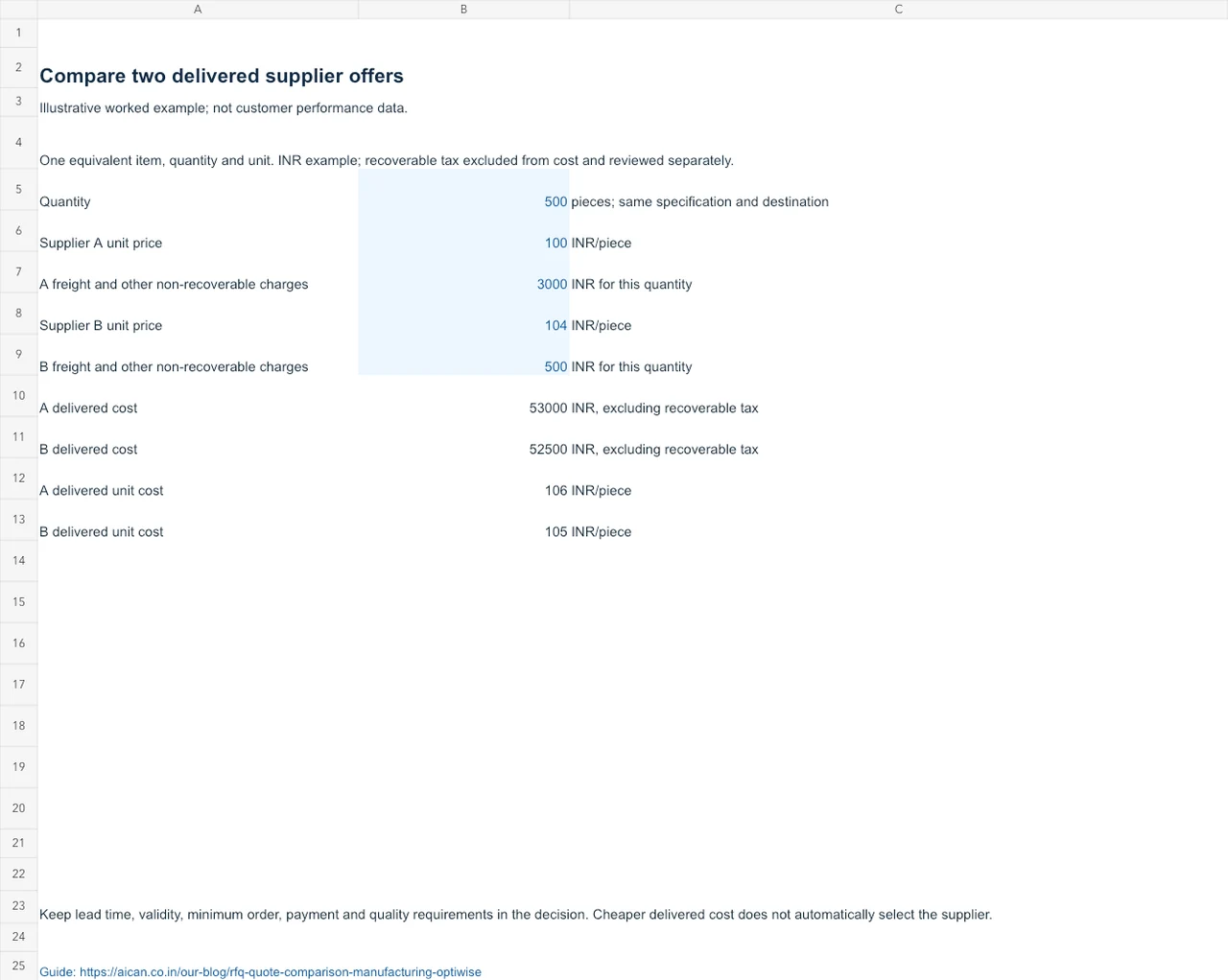
For an illustrative 500-piece order, Supplier A quotes ₹100 per piece plus ₹3,000 freight: ₹53,000, or ₹106 per delivered piece. Supplier B quotes ₹104 plus ₹500 freight: ₹52,500, or ₹105 per piece. These figures exclude recoverable tax and assume equivalent specifications and quantity.
Keep recoverable tax, non-recoverable charges and payment cash flow separate according to your finance treatment. Then read the required delivery date, minimum order, offer validity and inspection condition beside the amount. A lower delivered cost does not settle a quality or timing exception.
Carry the reason into the purchase order
Our purchasing workspace brings supplier price, delivery and quality history into the decision, with configurable scoring and AI-assisted recommendations. Where bidding is used, the supported rank-only view keeps other suppliers’ prices private. The buyer still resolves missing details and follows the required approval.
Convert the selected quotation to a PO and follow its receipt, inspection and invoice through the order timeline. Use the supplier review for historical performance and our partial receipt example when the delivery differs from what was ordered.
Use the worked example with your own inputs
Download the editable Excel worksheet. It includes a worked example and a blank input sheet. Blue cells are inputs; formula cells calculate the result. The figures illustrate the method and are not customer results or an automatic Optiwise import.
Walk through the task in Optiwise
Bring one job or order and its difficult exception to a factory walkthrough. We will follow the inputs, action and resulting record together. Optiwise implementation costs ₹0. Subscription, optional add-ons and IoT hardware are separate.
Related reference: ERPNext supplier scorecard criteria and period definitions.

Related Posts

Kanban System | Optiwise
Learn how a Kanban system works in manufacturing, where it helps, where it fails, and how Optiwise connects Kanban signals with inventory, purchase, and production planning.
12 Jun 2026Read more →ERP for Factory Operations: Follow Each Handoff
Follow a manufacturing order through material planning, buying, production, inspection and dispatch, with an owner for each delay or exception.
12 Jun 2026Read more →ERP for FMCG Companies in India
A practical guide to ERP for FMCG companies in India, covering distributor orders, batch tracking, expiry, inventory, production, schemes, costing, and reporting.
11 Jun 2026Read more →
Optiwise, Odoo, Acumatica and Business Central for Manufacturing
Compare manufacturing workflows in Optiwise, Odoo, Acumatica and Dynamics 365 Business Central. See what your factory can run in Optiwise.
11 Jun 2026Read more →