
Optiwise vs ERPNext for Production Planning
Compare Optiwise Smart Suggest with ERPNext Production Plan, Work Orders and subcontracting. Follow material supply, job execution and outside-work exceptions.

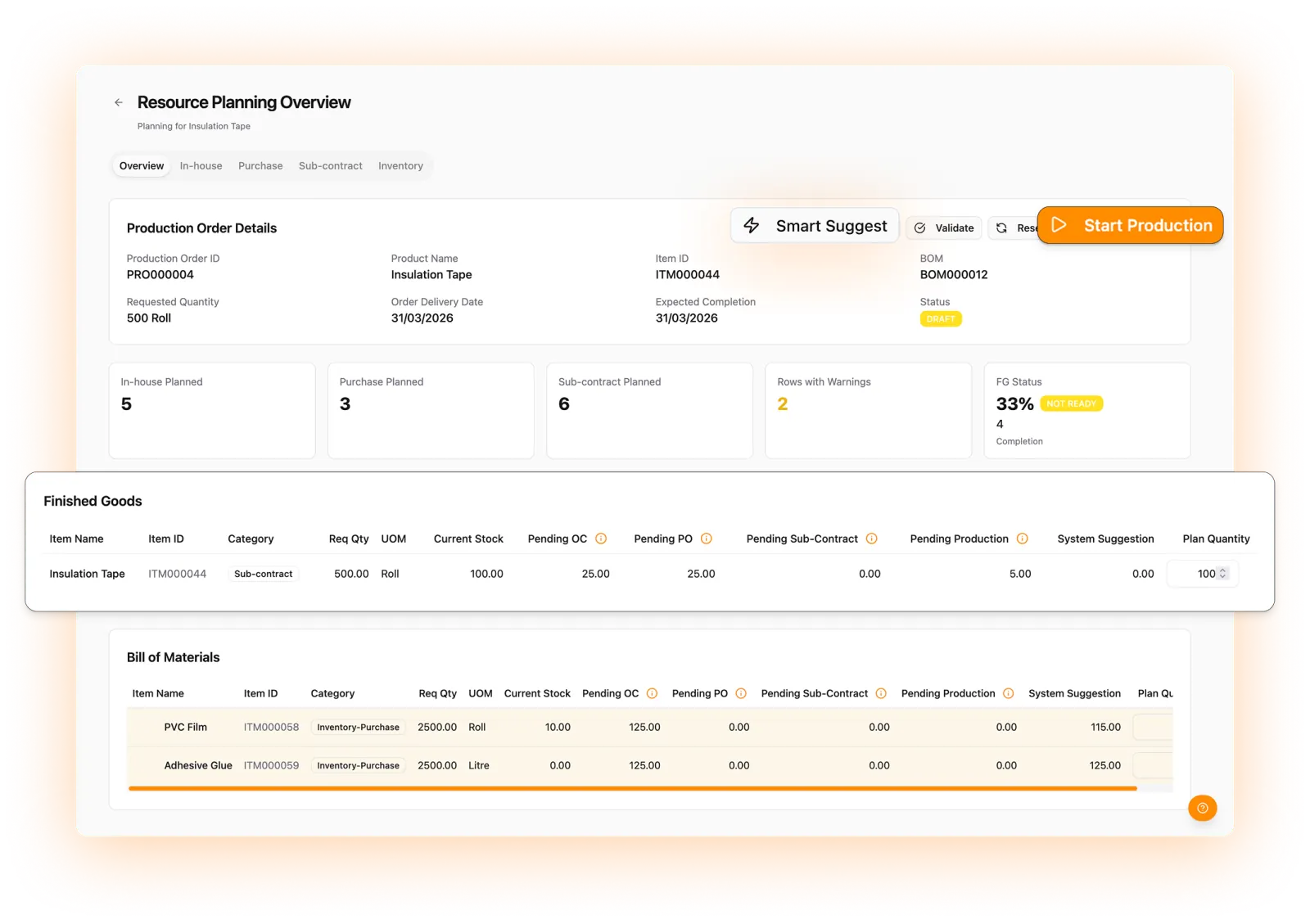
Plan the remaining material requirement and put the work into motion with Optiwise. Smart Suggest considers the bill of materials, stock, open purchase orders and existing production. Create purchase indents, in-house jobs and subcontract service orders, then follow their execution and quality records in the same factory system.
ERPNext's Production Plan also supports material planning, in-house work and subcontracting. Choose Optiwise for our connected planning-to-execution workflow, with supported AI actions, industrial IoT and no-code tools around the job.
Book a production-planning walkthrough · See Optiwise production
Compare planning and the records it creates
| Your task | Optiwise | ERPNext |
|---|---|---|
| Account for existing supply | Smart Suggest considers BOM demand, available stock, existing production and open purchases before recommending action quantities. | Production Plan can use projected quantities with Skip Available Raw Materials, or plan the full requirement without that option. |
| Make, buy or subcontract | Act through in-house, purchase and subcontract tabs in the production action centre. | Subassembly manufacturing type selects Work Order, subcontract PO or Material Request for purchase. |
| Issue and return material | Use requests or direct issues, extra issues and unused returns, with output-based deduction where configured. | Work Order tracks source/WIP quantities, transfer and consumption; Return Components creates a return stock entry. |
| Track execution | Record machine, worker, start/end time, output, inspection and rework against the process. | Job Cards track operations and Work Order supports partial finished-goods completion. |
| Follow outside processing | Service orders, challans, vendor-held material, partial receipts, quality and processing costs remain connected. | Subcontracting Order, supplier warehouse transfer and Subcontracting Receipt track supplied material and received output. |
Keep the supply assumptions visible
Consider an illustrative job needing 100 pieces. Forty accepted pieces are available and an open PO is due to supply another 30 before the job starts. The remaining need is 30 pieces if that supply is usable, on time and not required elsewhere. If ten of the 40 pieces are actually under a required quality hold, that assumption changes. A stock total alone cannot settle the start decision.
In Optiwise, planning retains the material hierarchy and the related purchase, production and subcontract actions. When a suggestion looks unexpected, check the selected planning basis, other pending demand and the state of already-created work. Your planner can then raise the remaining action without losing the order context.
ERPNext's Production Plan documents projected-quantity and manufacturing-type controls. Its settings affect which requirement is planned, so a comparison should use the intended configuration.
Carry the plan through the shop floor
Your stores team issues material and records any extra issue or unused return. Operators or supervisors enter the machine, worker, time and output against each process. Keep a failed inspection and rework quantity separate from accepted finished goods; the planner needs the remaining requirement, not just a completed-operation label.
ERPNext's Work Order also separates transfers and consumption and supports component returns. In Optiwise, choose the material-handling method for your factory and carry its records into the job report. A request to stores is different from a posted issue.
Keep subcontract material open until it is reconciled
With Optiwise, create the service order, issue the material on a challan and record additional issues where needed. Receive and inspect the returned output, then reconcile unused material and the vendor-held balance. An incomplete return should remain visible to the person following the outside work.
ERPNext's subcontracting workflow uses a supplier warehouse, raw-material transfer and Subcontracting Receipt. Its material-consumption settings affect the balance at the supplier.
Add AI, machine context and the forms your team needs
Use our AI copilot to retrieve connected records and perform supported actions within role permissions. Give the relevant job, item and store context rather than asking the agent to guess a missing manufacturing requirement.
Optiwise industrial IoT adds machine-state, runtime, downtime and energy information alongside your production work. Check the reading timestamp and job association before treating a machine signal as current job progress. OptiEdge's offline buffering applies to machine data.
Use no-code modules and forms for your own fields, relationships, formulas and event-driven work. A changed inspection or approval process can stay connected to the record the team already uses.
Start with the job your factory needs to finish
Optiwise implementation costs ₹0. Subscription, optional add-ons and IoT hardware are separate; our pricing page explains the displayed scope. Bring a BOM, usable-stock balance, open PO and one outside-process requirement. We will follow the planned action into execution and inspect what happens when material is held or output needs rework.
Production-planning questions
Does Smart Suggest only check the stock total?
No. Smart Suggest considers BOM demand, available inventory, existing production and open purchases to recommend the remaining in-house, purchase and subcontract actions.
Can we split work between our factory and a subcontractor?
Yes. Optiwise supports allocating the requirement to in-house and subcontract work, retaining the allocated and remaining quantities and the resulting records.
Related Posts

Solder Paste Tracking: Keep Each Jar’s Storage and Opening History
Track solder-paste jars beyond the expiry date. Keep storage removal, opening, job issue and returned paste linked, with a worked timing example in Optiwise.
3 Nov 2026Read more →Chemical Batching: Verify the Ingredient Before Charging
A correct weight can hide the wrong ingredient. Follow approved material, actual lots, weighing evidence and exceptions in an Optiwise batch workflow.
3 Nov 2026Read more →Fastener Returns: Check Grade, Coating and Lot Before Restocking
Handle mixed fastener returns without overstating usable stock. Follow the item, grade, coating, lot and quality decision through a worked Optiwise example.
3 Nov 2026Read more →
Optiwise Optimize Savings: What Shop-Floor Follow-Ups Are Worth
Test whether less shop-floor chasing can cover Optimize: a floor-only example, 13.3-minute break-even, job records, costs and editable calculator inputs.
2 Nov 2026Read more →