
Optiwise vs Odoo: Connect the Teams Behind Every Order
Compare Optiwise and Odoo for your manufacturing business. Bring sales, stores, purchasing, production and quality into a connected Optiwise workflow.
Give every department the context it needs to deliver the order. Optiwise connects sales, production, purchasing, stores and quality, with role-specific queues, AI agents and configurable approvals. Manufacturing ERP, shop-floor execution, industrial IoT, actionable AI and no-code customization work together in Optiwise.
A factory order crosses several teams before dispatch. With Optiwise, each handoff becomes a linked workflow: confirmed demand, material actions, production progress, inspection and finished stock.
Book an Optiwise demo · Explore Optiwise production
Optiwise and Odoo Manufacturing at a glance
| Your workflow | Optiwise | Odoo Manufacturing |
|---|---|---|
| Production | Run make-to-order and make-to-stock together. Generate work orders from confirmed sales, split or group work by product and coordinate production, purchase and subcontract actions from one action center. | Manufacturing orders, work centers and Shop Floor. |
| Inventory | Control raw material, WIP and finished goods across stores. Track variants, UOM conversions, batches and barcodes; manage issue/receipt/transfer requests and generate reorder indents from minimum/maximum levels. | Warehouse, location and replenishment workflows. |
| Purchasing | Source with production context: multi-vendor RFQs, a vendor portal, price/quality/delivery scoring, AI recommendations and rank-only bidding. Convert the selected quote to a PO and follow it through GRN and inspection. | Alternative RFQs and product-line comparison. |
Product references: Odoo Manufacturing · Odoo Inventory · Odoo quotation comparison. Updated 10 September 2026.
ERP + MES + industrial IoT + AI. One Optiwise platform.
AI that moves factory work forward
Ask about delayed orders, retrieve vendor history or create a stock entry in natural language. Optiwise routes the request to a specialized production, purchase, inventory, sales or task agent and executes within your role permissions. Your team can work in its own language.
Industrial IoT, from the device to the decision
Connect OptiEdge gateways, power monitors, machine-status signals and vibration sensors. Track OEE, runtime, downtime and energy. Our machine intelligence highlights abnormal signals, while the command center takes you from a multi-plant view to the machine that needs attention.
Your process, built into your ERP
Create relational modules, parent/child records, conditional forms, formulas and rollups without code. Add approvals, event-driven automations, webhooks and versioned SOPs so the system follows the way your factory operates.
Explore Optiwise AI agents · Explore industrial IoT · Explore no-code customization
Why choose Optiwise for your factory
Give sales a production connection
Keep inquiry, quote, approval and confirmed order history together. Sales confirmation creates the work order, while the order timeline tracks ordered, processed and pending quantities. Your commercial promise stays connected to the work needed to deliver it.
Give purchasing the material requirement
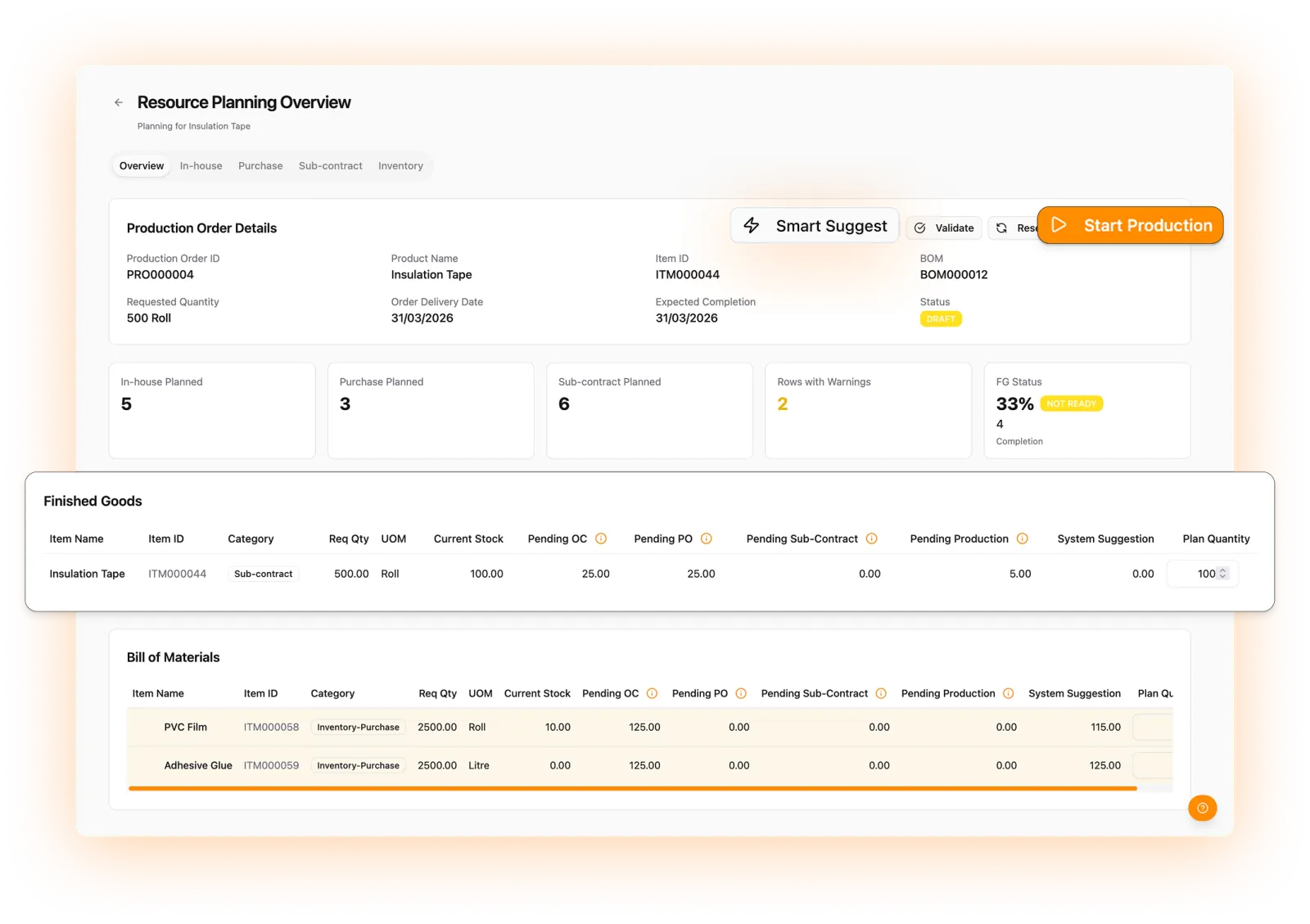
Smart Suggest compares production demand with stock, work already underway and pending POs. Buyers receive indents for the remaining actions. Compare quotations with vendor price, delivery and quality history, then follow the selected PO through receipt and inspection.
Give owners the exceptions that need action
Use department queues and dashboards to review approvals, shortages, order progress and vendor commitments. Ask our AI agents about the underlying records and initiate permitted actions. Add custom modules and automations when a process needs its own structure.
See your factory workflow in Optiwise
Bring your product, process and team requirements. We’ll walk you through the connected order-to-production workflow and map it to your factory.
Book your Optiwise demo · Meet your AI agents · Explore no-code workflows
Questions about Odoo Manufacturing and Optiwise
How does Optiwise connect sales and production?
A confirmed sales order can create work orders. Product quantities, planning actions and production progress stay connected to the customer order.
Can each department have its own view?
Yes. Optiwise provides role-specific queues and dashboards, with configurable permissions, views and approvals.
Does Optiwise include industrial IoT and AI?
Yes. Optiwise combines manufacturing ERP and shop-floor execution with industrial IoT and specialized AI agents. Connect machines through gateways and sensors, track OEE, downtime and energy, and use natural-language queries and actions across production, purchasing, inventory, sales and tasks. No-code modules and automations let you extend the workflow.
Related Posts

Kanban System | Optiwise
Learn how a Kanban system works in manufacturing, where it helps, where it fails, and how Optiwise connects Kanban signals with inventory, purchase, and production planning.
12 Jun 2026Read more →Erp In Operations Management | Optiwise
Learn how ERP improves operations management by connecting planning, inventory, purchase, production, quality, dispatch, finance, and reporting.
12 Jun 2026Read more →ERP for FMCG Companies in India
A practical guide to ERP for FMCG companies in India, covering distributor orders, batch tracking, expiry, inventory, production, schemes, costing, and reporting.
11 Jun 2026Read more →
Optiwise, Odoo, Acumatica and Business Central for Manufacturing
Compare manufacturing workflows in Optiwise, Odoo, Acumatica and Dynamics 365 Business Central. See what your factory can run in Optiwise.
11 Jun 2026Read more →