
Create the inspection request
GRN and production-stage requirements enter the quality queue with their material or job reference.
Loading Optiwise
Optiwise quality control
Connect receipt and production inspections, configurable QC forms, rework decisions and stock release in one manufacturing workflow.

GRN and production-stage requirements enter the quality queue with their material or job reference.
Attach the configured inspection form, parameters and required evidence for the item or operation.
The responsible quality user records the observations and pass, fail or rework disposition.
Accepted stock follows the configured quality gate. Rejected or rework quantities retain their next action.
Optiwise creates quality requests from GRNs and production stages, routes them to quality personnel and keeps pending inspections in a central queue. Build the QC process and form around the checks your team performs, then record the result before releasing the affected material.
| Record | What to capture | Purpose |
|---|---|---|
| Material and work reference | Item, batch where applicable, quantity, unit, GRN or production job | Identify the exact material inspected |
| Inspection requirement | QC process, parameter, method and approved acceptance criterion | Give the inspector a defined check |
| Result and evidence | Measured value or observation, supporting photo/document and inspection time | Retain what was observed |
| Inspector and authority | Responsible user and required review or approval | Assign the disposition decision |
| Disposition | Accepted, rejected, rework or unresolved quantity and next action | Keep usable stock distinguishable |
| Reinspection | Original reference, rework record, new result and final decision | Explain the additional event without adding pieces |
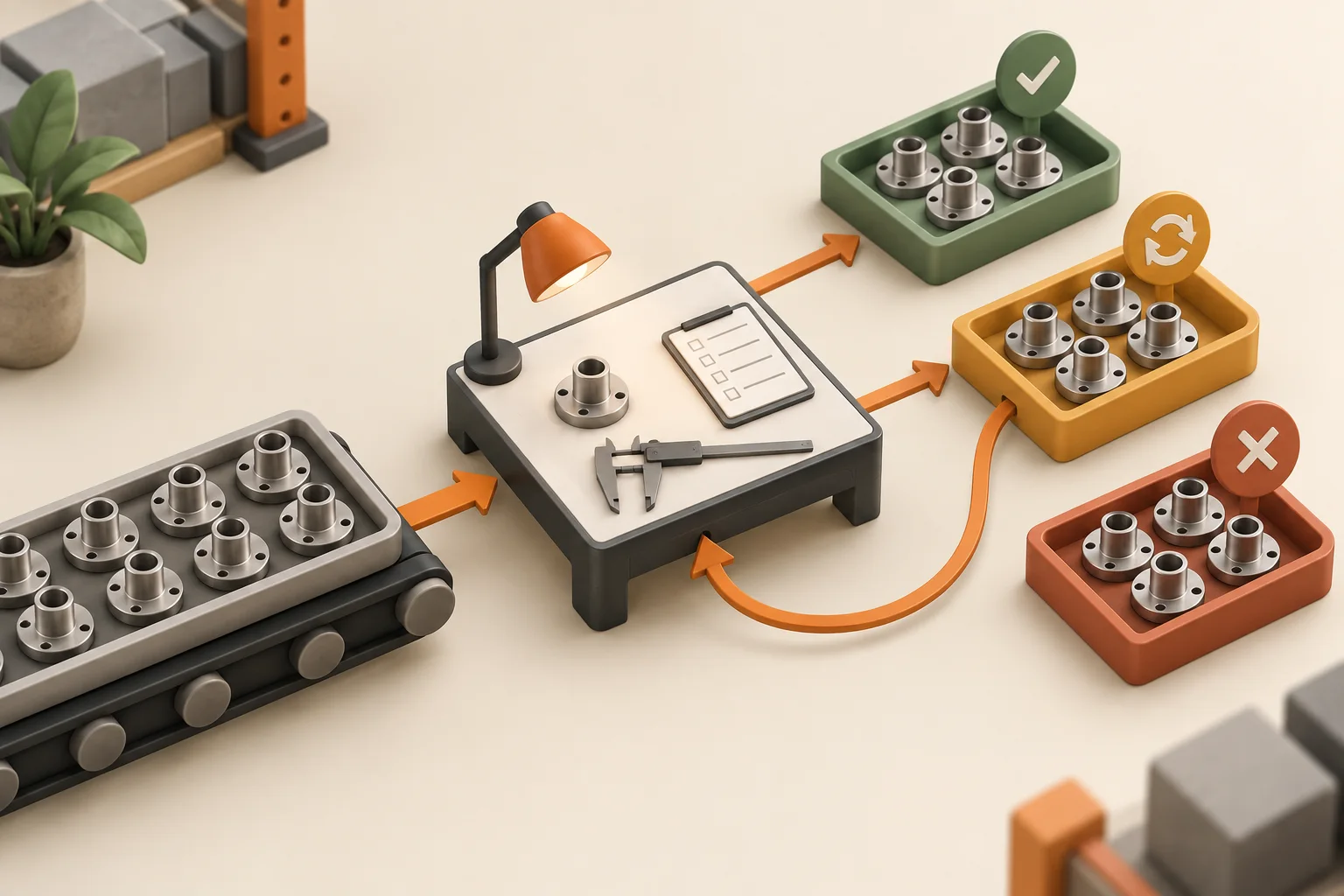
Illustrative receipt: 100 pieces are inspected. Eighty pass, fifteen require rework and five fail. The fifteen rework pieces remain part of the original receipt. A hold is their current status, not another quantity to add.
| Stage | Accepted | Rework / unresolved | Rejected |
|---|---|---|---|
| Initial inspection of 100 | 80 | 15 | 5 |
| Reinspection of the same 15 | 12 from rework | 0 remaining | 3 from rework |
| Final physical disposition | 92 total | 0 remaining | 8 total |
Final accepted quantity is 80 + 12 = 92. Final rejected quantity is 5 + 3 = 8. The balance remains 92 + 8 = 100 pieces. There were 115 piece-inspection events, but only 100 physical pieces; do not treat the reinspection workload as additional stock.
Retain the rework decision, action and reinspection result. If rework is still open, keep that quantity unresolved and assign the next owner. Rejected purchase material can follow reject-store and supplier-return handling; production rework follows its required operation.
Configure item-level receipt inspection and embed QC stages in production routing. For material requiring QC, acceptance controls stock release through the configured workflow. The buyer, stores user and inspector can follow the receipt and any rejected return through the purchasing timeline.
No-code forms support required fields, conditional logic, media and role access. Define which parameters apply, how results are recorded, and who can approve pass, fail or rework. Versioned SOPs can carry process instructions and acknowledgments for the relevant machine or operation.
Production records carry machine, worker, time and quantity context. Industrial IoT adds machine-state, runtime, downtime, power and vibration information for investigation. Use those records alongside the inspection result to examine the affected job or batch.
Our AI layer retrieves connected records and performs permitted workflow actions. Keep the approved measurement method, acceptance criterion and disposition authority with the inspection so the team can trace the decision.
After the inspection decision, keep the affected job, quantity, reason and actual rework or scrap action together. Use the poor-quality cost guide to prepare the material, time and other recorded loss inputs. Reinspection adds inspection work; it does not add another physical part to the stock balance.
For a visual check, retain the agreed sample or defect reference and the acceptance requirement. Our visual inspection guide explains how to keep the observation with the responsible decision. Bring the original result, disposition and follow-up work so your quality and production users can trace the same event.
Bring one inspection form, a GRN, a production QC stage and a rework example. Follow each with your receiving, quality and production users. Check the queue, required evidence, stock-release decision, return or rework action, and final quantity reconciliation.
Book an Optiwise demoYes. GRN-linked and production-stage quality requests enter the quality workflow. Configure the item requirements, routing stages, inspection forms and responsible quality roles.
Yes. Build QC processes with configurable fields and forms. Define the parameters, required results, supporting media and role access for the inspection your team performs.
No. Reinspection is another event for the affected quantity. Retain the original receipt or production reference and record the final accepted, rejected or unresolved disposition without counting the same pieces twice.
For items with a required quality gate, acceptance controls release through the configured GRN or production workflow. Rejected material follows reject-store, return or rework handling as applicable.
Follow pending quality work from purchasing and production in the quality team’s dashboard.
Build QC processes and attach forms with the fields required for each inspection.
Embed quality steps in routing so inspection stays connected to the operation and job.
Set item-level QC requirements and release accepted quantities through the GRN workflow.
Record pass, fail or rework, with the relevant return, reject-store or production action.
Use recorded rejection and quality history alongside delivery and price when reviewing suppliers.