
Optiwise vs Odoo Purchase: Buy with Factory Context
Compare purchasing in Optiwise and Odoo. Use material demand, vendor history, RFQs, AI recommendations and quality-linked receipts in Optiwise.
Make every purchase decision with the factory requirement and vendor history in view. Optiwise connects production shortages, multi-vendor RFQs, quote comparison, purchase orders and quality inspection. Get advanced sourcing, manufacturing execution, industrial IoT, AI agents and no-code workflows in one factory platform.
A quote is one part of the decision. Your buyer also needs the required quantity, delivery commitment, previous quality results and stock already on the way. Optiwise brings those inputs into the purchasing workflow.
Book an Optiwise demo · Explore Optiwise purchasing
Optiwise and Odoo Purchase at a glance
| Your workflow | Optiwise | Odoo Purchase |
|---|---|---|
| Vendor RFQs | Send multi-item RFQs to multiple vendors through email or WhatsApp and collect responses through the vendor portal. Keep the original material requirement attached to the sourcing decision. | Create alternative RFQs for multiple vendors. |
| Compare offers | Compare supplier quotes against past prices, delivery reliability and quality performance. Use configurable scoring and AI recommendations to make the trade-off explicit before choosing a vendor. | Compare product lines across linked quotations. |
| Select a supplier | Set the scoring criteria for price, quality and delivery, review AI recommendations and run rank-only bidding. Vendors see their rank without seeing competitors’ quoted prices. | Choose product lines from the alternative offers. |
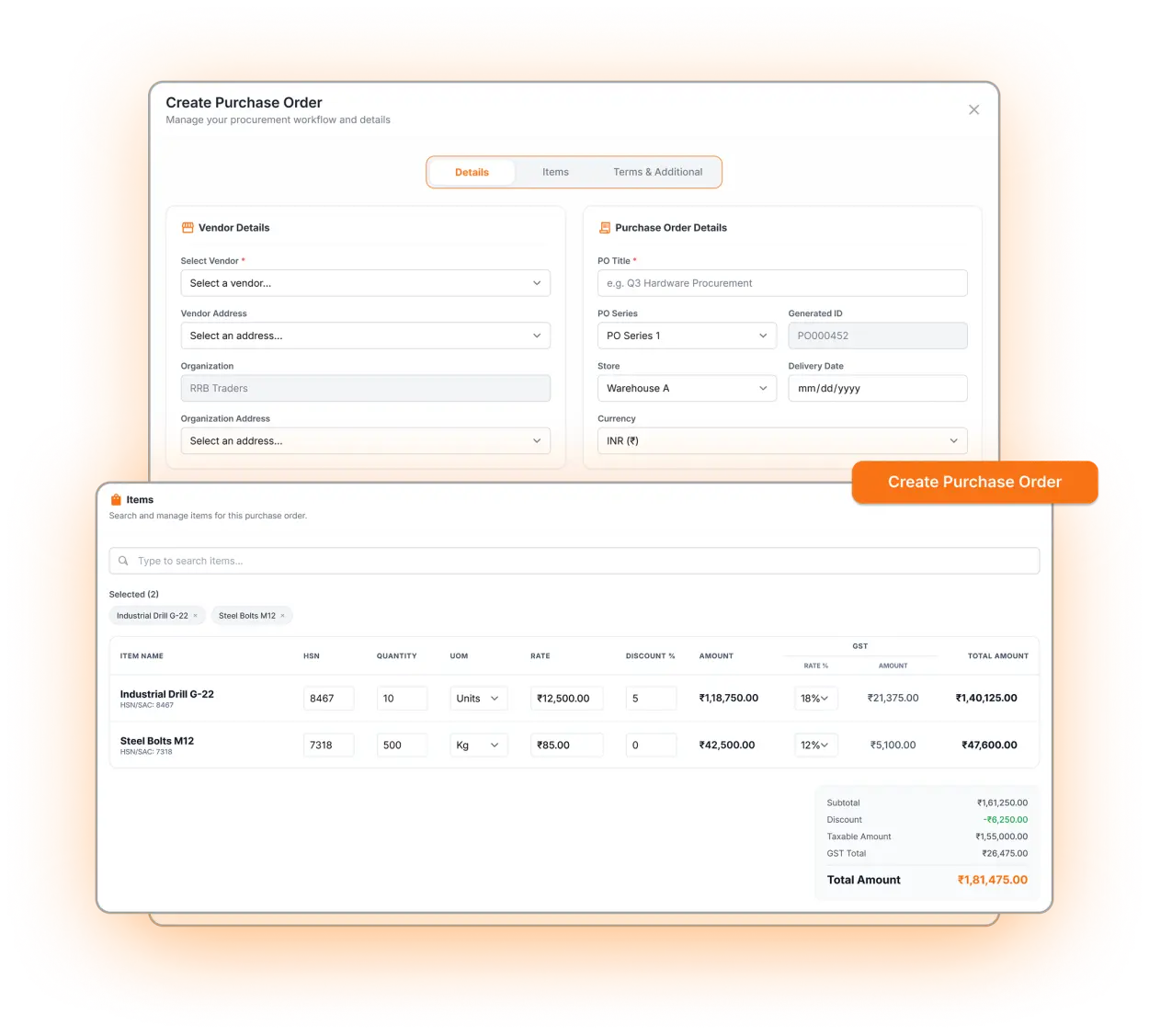
| Create the order | Turn the selected quotation or existing vendor price into a purchase order. Retain item, commercial-term and delivery detail, then track receipts, invoices, returns and closure on the PO timeline. | Confirm the selected quotation as a PO. |
Product references: Odoo quotation comparison. Updated 10 September 2026.
Advanced purchasing inside your complete factory system
AI that helps you buy and act
Bring vendor quote history, quality performance and delivery reliability into supplier selection. Use AI recommendations alongside your scoring rules, then work with the purchase agent in natural language to retrieve records and carry out authorized purchasing actions.
A buying decision connected to the factory
Optiwise brings purchasing, inventory, manufacturing execution and industrial IoT into one platform. Plan shortages from actual BOM demand and existing supply, and follow machine performance through OEE, downtime and energy dashboards in the same factory system.
Your sourcing process, your rules
Configure vendor scoring, run rank-only bidding and add the approval path your team needs. Build custom relational modules, forms, PDF templates and event-based automations without code, with supplier communication through email or WhatsApp.
Explore Optiwise AI agents · Explore industrial IoT · Explore no-code customization
Why choose Optiwise for your factory
Build the buying list from actual demand
Create indents from department requests, reorder levels or production shortages. Smart Suggest takes current stock, existing production and pending purchases into account. The buyer starts with an actionable requirement rather than a disconnected list of items.
Bring vendor performance into the choice
Compare quoted rates and terms with the vendor’s price, delivery and quality history. Configure scoring rules and use AI recommendations to review the options. Run vendor bidding when appropriate, showing each participant its rank without exposing other vendors’ bid prices.
Follow the PO through acceptance and closure
Track inward entries, GRN, item inspections, invoices and returns on the order timeline. Release accepted material after QC, keep rejected quantities separate and record partial or excess deliveries. Invoice-photo OCR extracts vendor and item details for entry.
See your factory workflow in Optiwise
Bring your product, process and team requirements. We’ll walk you through the connected purchasing and receipt workflow and map it to your factory.
Book your Optiwise demo · Meet your AI agents · Explore no-code workflows
Questions about Odoo Purchase and Optiwise
Can Optiwise compare multiple vendor quotations?
Yes. Send RFQs to multiple vendors, collect their quotations and compare offers with vendor delivery, quality and price history. Use scoring and AI recommendations to support selection.
Does Optiwise connect purchasing to production shortages?
Yes. Production planning can create purchase indents from material requirements after accounting for stock and pending supply.
Does Optiwise include industrial IoT and AI?
Yes. Optiwise combines manufacturing ERP and shop-floor execution with industrial IoT and specialized AI agents. Connect machines through gateways and sensors, track OEE, downtime and energy, and use natural-language queries and actions across production, purchasing, inventory, sales and tasks. No-code modules and automations let you extend the workflow.
Related Posts

Steel Receipts in Sheets, Square Metres and Kilograms
Reconcile sheet count, nominal area and actual weight on one steel receipt. Keep conversion assumptions and supplier discrepancies visible before release.
7 Nov 2026Read more →Keep the Heat Number With Every Cut Bar Piece
Keep cut billets and reusable bar ends linked to their heat certificate. Follow the physical ID, job issue and missing-mark decision in Optiwise.
1 Nov 2026Read more →AI in Procurement: What Changes in Your Daily Work
Use Optiwise to compare supplier offers and follow the selected quote into a purchase order, while keeping delivery, quality and approval decisions clear.
14 Jun 2026Read more →How Cloud Procurement Handles a Factory Material Shortage
Follow a factory purchase from material need through approval, supplier comparison, order, receipt and inspection, including partial delivery and held stock.
12 Jun 2026Read more →