
Keep the Heat Number With Every Cut Bar Piece
Keep cut billets and reusable bar ends linked to their heat certificate. Follow the physical ID, job issue and missing-mark decision in Optiwise.


Keep every cut billet and reusable bar end linked to its parent bar, heat number and material certificate before the pieces can mix. In Optiwise, we connect the material issue, job record and configured identity fields so stores and production can follow the same material through the next handoff.
A certificate saved against a receipt is useful only while your team can connect it to the steel in front of them. A saw cut can break that connection: the original mark stays on one end, while several same-sized blanks leave the machine without an identity. The next operator can see the diameter but cannot establish which heat supplied the piece.
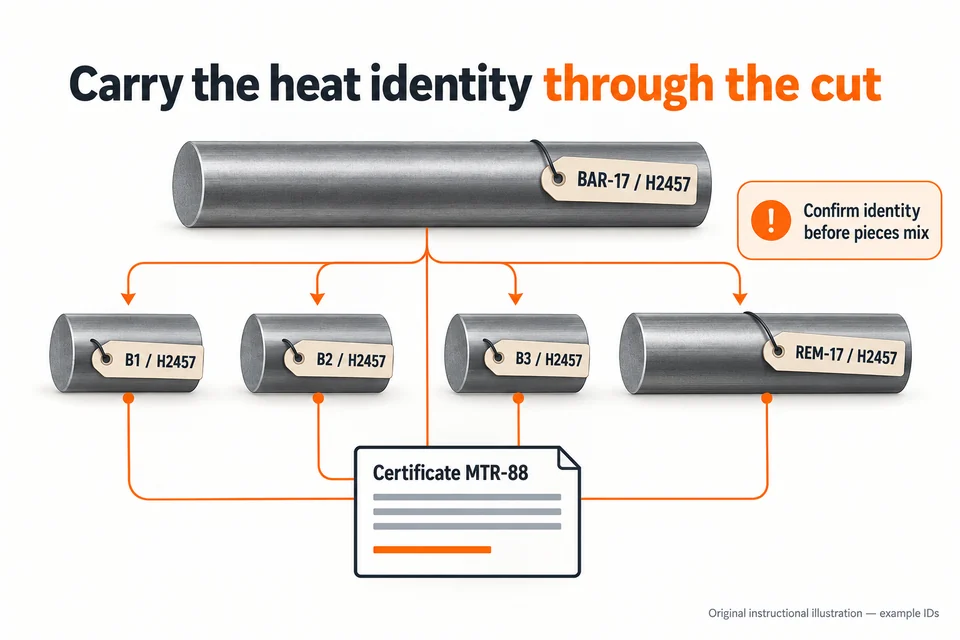
Agree how the identity will travel before cutting
Start with the material requirement for the job. Confirm the required grade, dimensions, certificate and level of traceability with the responsible quality or technical owner. A heat number identifies the material heat; your piece ID identifies the particular bar, billet or remnant you are handling. Keep both when the job requires them.
Choose the marking or controlled-tagging method that suits the material, later operations and customer requirements. Agree who checks the original mark against the certificate, who carries the identity to the cut pieces, and when the next person checks it. The ACES/IES Steelworks Supervision Guide includes transferring heat numbers to cut components in its structural-steel fabrication guidance. That guide has a specific construction context; your approved job requirements determine the method and traceability needed here.
Follow one bar into three billets and a remnant
Consider an illustrative parent bar BAR-17, heat H2457, linked to material test report MTR-88. The cutting job produces billets B1, B2 and B3 and a reusable end REM-17. Before those pieces enter another rack or work area, each needs the agreed physical identity and a record of its relationship to BAR-17 and H2457. The diagram shows that relationship, rather than a dimensional cutting plan.
The cutting record also needs the actual quantities and units your factory uses. Keep the reusable end separate from process scrap, and record its usable dimensions and location. The existing steel inventory guide explains weight and remnant reconciliation. The additional check here is whether each physical piece still leads back to the correct certificate.
At the next operation, the receiver matches the piece ID to the job and material requirement before using it. B2 may be the correct diameter and still belong to a different heat than the job permits. A nearby certificate or another billet's readable mark cannot establish B2's identity.
Connect the cutting handoff in Optiwise
We bring material movements, production jobs and quality records into one connected factory system. Start with the received item, lot or stock reference and its supporting document. Configure the heat, parent-piece and resulting-piece references on the relevant forms, with the material certificate attached or linked through the agreed record.
Stores issues the identified material to the job. Production records the cutting work, actual output and relevant custom data or photos. Excess usable material can return through the supported material-return flow. Record the reusable end's identity and location alongside that return, so the next issue starts from the known piece. The bar-specific parent-to-piece relationship and marking checks need to be designed in your forms and operating procedure; entering a weight does not automatically create that relationship.
The resulting job and stock records give the next operator a place to find the original material reference, recorded movements and quality decision. A barcode can make a mapped record easier to select. It still needs to remain correctly attached or associated with the physical piece.
Handle a missing mark without guessing the heat
If a billet loses its identity after pieces from two heats have mixed, keep the uncertain material apart under your quality procedure. Record where it was found, the possible source jobs and what evidence remains. Quality decides whether the identity can be re-established under the applicable requirements, whether further examination is needed, or whether the piece must be rejected or used differently with the required approval.
Do not copy H2457 onto the billet because the nearest bar carries that mark. Record the unresolved identity and the decision. If material has already moved downstream, use the linked job and stock history to identify the affected work that needs review. Software can preserve the recorded chain; it cannot reconstruct a lost physical identity from appearance alone.
Use the next issue as the handoff check
For your first trial, follow BAR-17 through cutting, issue B2 to a job and return REM-17 to stores. Have the receiving person trace both pieces back to MTR-88 without relying on the saw operator's memory. If a link is missing, fix that handoff before repeating it across more jobs. If the parts then go for outside treatment, carry the same concern into part identification through galvanizing.
Does a barcode prove the material heat?
A barcode retrieves the record it is mapped to. The physical piece, original material evidence and recorded mapping must agree. Scanning the wrong tag will still retrieve the wrong record.
Can we keep the certificate only on the original receipt?
You can retain the original document there if the downstream records lead back to it clearly. Check that a user starting from a cut billet or returned remnant can find the right receipt and certificate.
Bring one cut-bar handoff to an Optiwise factory walkthrough. We can map the receipt, cutting job, material issue, reusable return and quality decision with your team.
Related Posts
AI in Procurement: What Changes in Your Daily Work
Use Optiwise to compare supplier offers and follow the selected quote into a purchase order, while keeping delivery, quality and approval decisions clear.
14 Jun 2026Read more →Cloud Procurement | Optiwise
Learn cloud procurement for SMEs and manufacturers, including purchase requests, approvals, supplier follow-up, inventory linkage, and how AICAN Optiwise improves control.
12 Jun 2026Read more →Benefits of Inventory Management for Manufacturers
Connect stock accuracy, production readiness and cash decisions in Optiwise, with a worked example of accepted, held and reserved material.
9 Jun 2026Read more →Automated Inventory: Record the Movement Behind the Scan
Use Optiwise to follow one receipt, quality release and material issue, with an item, unit, location and job reference behind each stock update.
8 Jun 2026Read more →