
Cancelled Subcontract Orders: Recover and Reconcile Material
Recover vendor-held material after subcontract cancellation. Use a worked quantity reconciliation, stop acknowledgement and return-inspection checklist.

When a subcontract order is cancelled, confirm the stop boundary with the vendor, identify material already processed or in transit, and reconcile every issued quantity to return, retained stock or authorised disposition. Close physical recovery separately from commercial settlement.
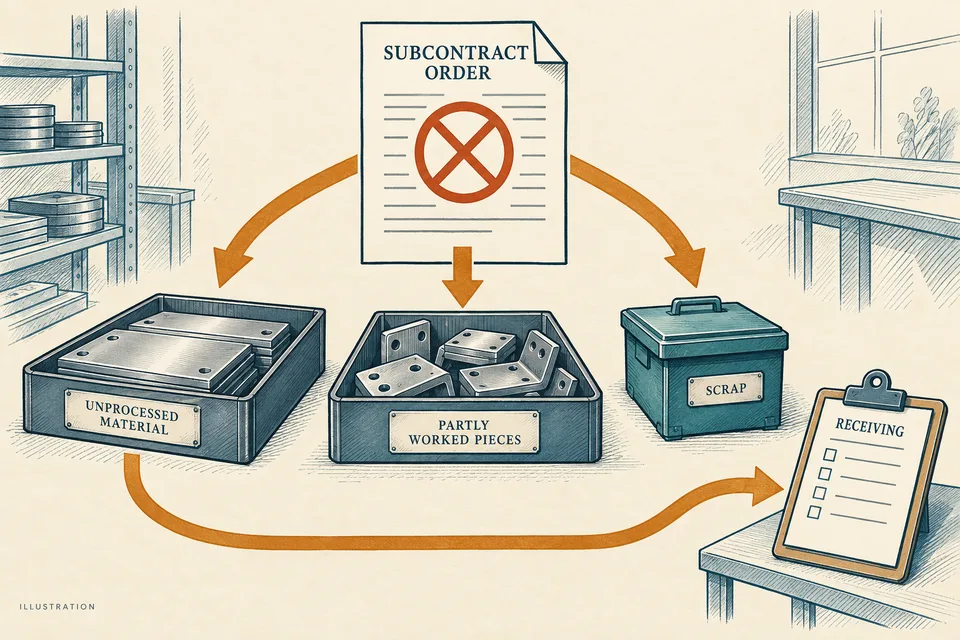
Purchasing cancels an outside job. The service order stops appearing on the immediate plan, but the vendor may still hold raw material, part-finished pieces, scrap and completed output. The buyer needs an acknowledged stop and a quantity statement before calling the job closed.
Confirm when work actually stopped
Send the authorised cancellation or stop instruction against the exact service order and revision. Record its issue time, recipient and acknowledgement. Ask the vendor to state the last operation completed, quantities at that point, work still in process and material already dispatched. Until acknowledged, treat the stop time as unconfirmed.
The subcontract coordinator owns this recovery. Production identifies what can be returned at its current process stage; quality determines inspection and disposition; stores reconciles movements; purchasing and finance handle the commercial position.
The ERPNext subcontracting documentation provides a reference for connecting supplied materials with subcontracted output. The cancellation workflow here is our own operational worksheet. Its purpose is to preserve those connections when the original plan ends early.
Build one statement at the agreed cut-off
| Record | What the vendor and internal owner confirm |
|---|---|
| Instruction | Order, revision, scope, issue time and acknowledged stop time |
| Material issued | Item, lot, unit and dispatch document |
| Current categories | Unprocessed, part-finished, completed, scrap and in-transit quantities |
| Recovery decision | Return, retain for authorised work, or other approved disposition |
| Return evidence | Package identities, dispatch reference and receiving quantities |
| Closure exceptions | Difference, current location, next owner and due date |
Do not add unlike units or count the same material in both WIP and completed output. For a transformation using several materials, reconcile each input under its approved consumption basis. Record unexplained differences rather than using a scrap line to force a balance.
Reconcile a one-piece-to-one-piece example
Illustrative scenario: 500 identifiable metal blanks were issued, with one blank becoming one component. At the acknowledged stop, 80 completed components have already been received. The vendor statement lists 170 unprocessed blanks, 200 partly worked pieces, 40 completed pieces awaiting return and 10 scrap pieces.
The statement accounts for the issue: 80 + 170 + 200 + 40 + 10 = 500. The 420 pieces still with the vendor need explicit recovery or disposition. The count alone does not make partly worked pieces usable or authorise disposal of scrap.
Suppose the first return contains the 170 blanks and 40 completed pieces. Receiving counts 210 pieces and records each category separately. The vendor balance falls to 210: 200 partly worked and 10 scrap. It reaches zero only when those remaining quantities are received or covered by an authorised, evidenced disposition.
Handle movement during the cancellation window
A shipment that left before acknowledgement may arrive after the order was marked cancelled. Retain its dispatch and receiving records and reconcile it to the statement. Do not delete the movement or create an unrelated receipt to make the old order appear empty.
If the vendor reports a different count, compare the original issue documents, prior receipts and current physical categories together. Assign the difference to an owner. If material will remain for a replacement order, record the authorised transfer of purpose with both order references and confirmed quantity.
Returned WIP needs its operation status and identity preserved. Quality decides the checks required before further use. Missing lot identity or damage creates a receiving exception; it does not disappear because the supplier has sent everything back.
Close physical recovery and money on their own evidence
Stores and the subcontract coordinator close physical recovery when each issued quantity has an agreed destination, returns have been counted and inspected as required, and no unexplained vendor balance remains. Finance separately resolves services performed, claims, invoices and credits under the agreed commercial terms.
A zero stock balance does not prove a zero payable. A settled invoice does not prove that all material returned. Keep the two statuses visible with their respective owners and supporting records.
Follow the vendor balance in Optiwise
We create vendor dispatch challans, track pending material balances, record subcontract inward quantities and connect quality, returns and commercial events. Use those records with Optiwise production and inventory to support the cancellation review. Record the stop acknowledgement and recovery decision alongside them; cancellation should not erase the movement history.
Subcontract-recovery questions
Can the order close when the cancellation email is sent?
The instruction alone does not reconcile work or stock. Confirm acknowledgement, account for every quantity and retain open recovery and commercial actions until their owners close them.
Should partly worked material be received as finished goods?
No. Preserve its actual process status and identity, then follow the approved inspection and disposition path before further production or use.
Bring a cancelled outside-work order to an Optiwise demo to map the issue, vendor balance, recovery and closure records.
Related Posts

Fabric Shade Groups: Allocate Rolls to a Cutting Lay
Allocate fabric rolls to cutting lays with shade-group approval, usable-length checks and remnant identity. Includes a two-group worked allocation example.
30 Sept 2026Read more →
Powder Coating Reclaim: Keep Each Blend Traceable
Build a powder-coating reclaim record with parent lots, approved blend rules, mass reconciliation and job links. Includes a clearly illustrative balance example.
30 Sept 2026Read more →
Torque Tool Job Changes: Record the Approved Setting
Use a torque-tool job-change record to connect joint revision, units, tool identity, setup verification and the first affected assembly without inventing settings.
30 Sept 2026Read more →
Opened Adhesive Containers: Record Dates Before Reissue
Track partially used adhesive containers with opening dates, supplier limits, storage exceptions and an issue-return worksheet. Avoid invented expiry extensions.
30 Sept 2026Read more →