
Optiwise Optimize Savings: What Shop-Floor Follow-Ups Are Worth
Test whether less shop-floor chasing can cover Optimize: a floor-only example, 13.3-minute break-even, job records, costs and editable calculator inputs.


Use Optimize to connect the office team with the people recording work on the floor. This conservative example counts only 25 shop-floor users’ time: 162.5 hours worth ₹14,062.50 a month against a ₹12,500 software equivalent on yearly billing.
We recommend Optimize when the office has an order record but still relies on calls to find out what happened on the floor. Its published allowance is 10 main users and 25 shop-floor users. The question is whether those connected updates remove enough waiting, repeated reporting and reconstruction to justify the subscription.
Make an unfinished job understandable before the next shift
Consider an illustrative one-blank-per-piece job. Stores issued 120 blanks. The operator machined 90 pieces: 86 passed inspection and four need rework. Of the unused blanks, 20 returned to stores and 10 remain on the floor. “The job is nearly done” does not tell a planner which quantity can move, what needs correcting or where the remaining material is.
In our shop-floor workspace, operators or supervisors record the assigned job and actual quantities. Production, quality and material-return records keep the exceptions with the work. The next shift can follow the four rework pieces and the remaining blanks rather than start by asking everyone for the story.
The 120 blanks issued are not proof that 120 were consumed, and 90 machined pieces are not 90 accepted pieces. Keep those quantities separate. Our production workflow supports material issues, extra issues, output, rework and returns; the configured issue or output-based consumption method determines the stock entry.
Optimize also includes AI agents. You can ask about connected job or order information and follow the relevant record, with supported actions governed by roles and approvals. The calculation below counts the shop-floor time once and adds no separate AI benefit. An answer is useful when the underlying entry is current and someone can act on the exception.
Let floor time carry the whole software cost
To test a narrower business case, exclude every office-time benefit. Give the 25 shop-floor users 15 minutes back each working day, over 26 days. At an illustrative ₹18,000 monthly employment cost and eight-hour working day, each hour is valued at about ₹86.54.
The working is 25 × 15 ÷ 60 × 26 = 162.5 hours a month. At the stated hourly cost, that is ₹14,062.50 in time value. The 10 main users remain licensed, but their saved time is set to zero. Inventory and downtime are also zero, so no stock or machine saving is helping this example.
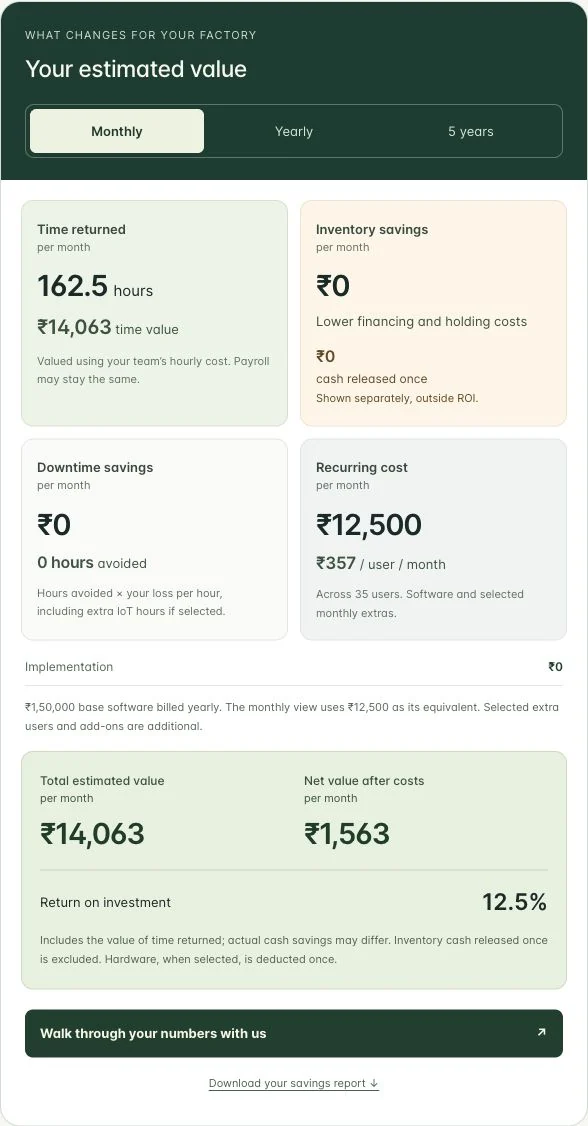
Optimize software is ₹1,50,000 billed yearly, equivalent to ₹12,500 monthly. This leaves ₹1,562.50 of modelled monthly time value after the software equivalent. Across all 35 included users, software averages about ₹357 per user per month. We still assign the entire ₹12,500 cost to the floor-only case; we have not reduced the cost because only 25 people contribute a benefit.
| Period | Time value | Software | Value after software |
|---|---|---|---|
| One equivalent month | ₹14,062.50 | ₹12,500 | ₹1,562.50 |
| One year | ₹1,68,750 | ₹1,50,000 | ₹18,750 |
| Five years | ₹8,43,750 | ₹7,50,000 | ₹93,750 |
The five-year view repeats the same operating month and prices. It adds no growth or compounding and predicts no future price. Time value measures work capacity; actual cash savings require spending to fall.
The break-even test is about 13.3 minutes
At ₹18,000 monthly cost per floor user, returning about 13.3 minutes per person per day matches the yearly subscription’s ₹12,500 monthly equivalent. If you choose ₹15,000 monthly billing, the threshold is 16 minutes. The 15-minute floor-only case is therefore ₹937.50 below monthly billing, even though it is above the yearly equivalent.
This makes the observation task specific. Are people waiting for a material issue, repeating an output update, searching for the correct job instruction or explaining rework to the next shift? Record which step changed and how long it took before and after. Include the effort of entering a useful update. A new reporting step that nobody uses is extra work, not a saving.
NIST’s value stream mapping guidance starts with the current flow of materials and information and uses people from different functions to find improvements. Use that approach to trace one job’s handoff. NIST’s guidance is a method reference, not evidence for the 15-minute assumption.
Keep the cost boundary visible
Optiwise implementation costs ₹0. Optional add-ons, hardware and applicable taxes are separate. The displayed Optimize IoT device package is ₹3,00,000 once, and this software-only example does not include it. If you add devices, enter that cost and only the extra machine benefit you can support.
The full starting Optimize example in our general factory savings guide also counts office time, inventory carrying costs and downtime. This article deliberately tests a smaller claim: whether the shop-floor handoff alone can carry the software cost. Do not add the two examples together.
Recreate the case, then replace the assumptions
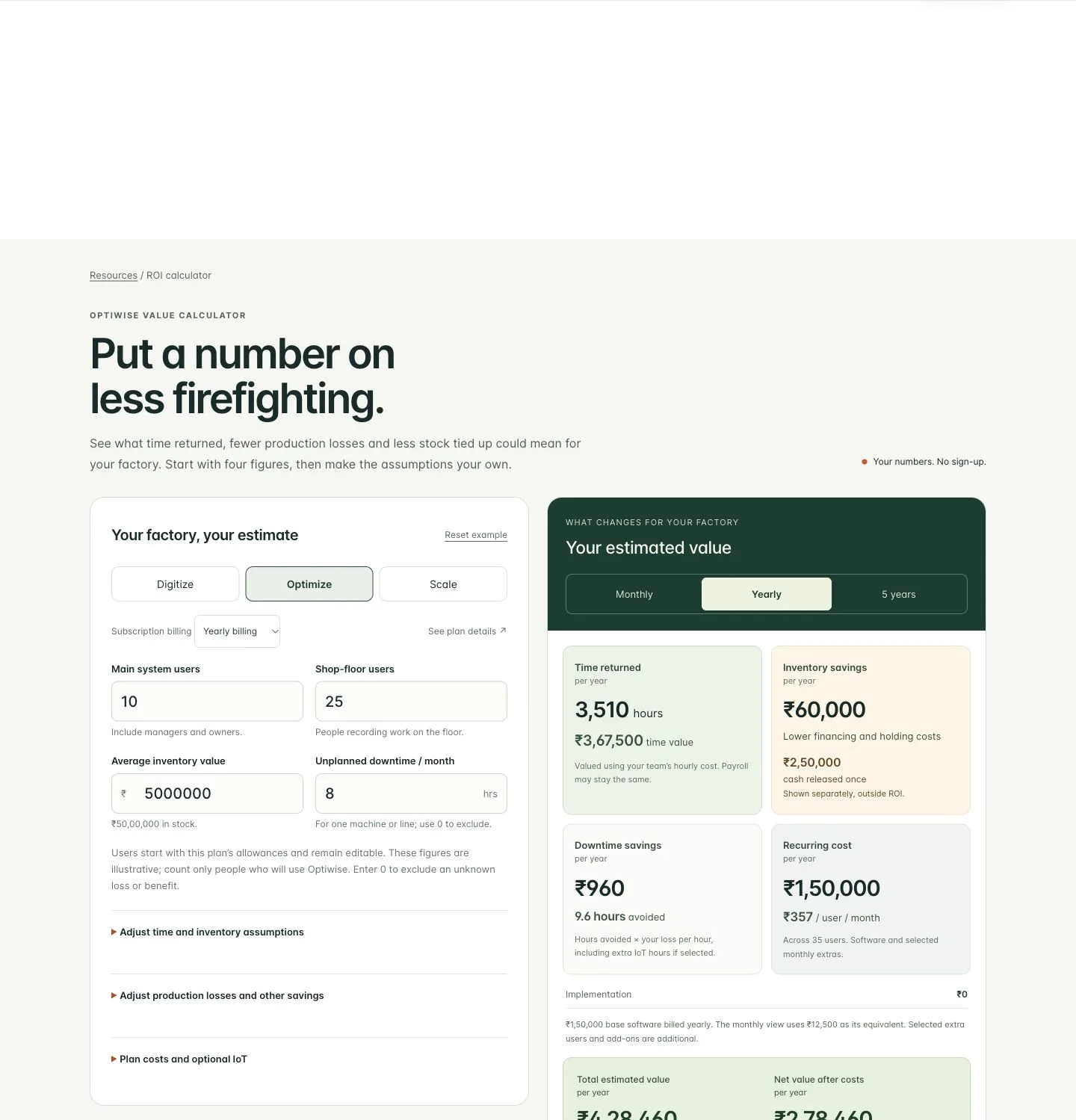
Open the Optimize savings calculator. Keep 10 main and 25 shop-floor users. Set inventory and downtime to zero. Under time assumptions, set office minutes and manager hours to zero; leave shop-floor minutes at 15 and the floor salary at ₹18,000. You now have the floor-only example shown above.
Pick a normal job across two shifts and keep its issue, output, inspection, rework and return records together. Compare the time people spend getting the next decision made, not just the time spent typing. Then use your own observed minutes in the calculator.
Can we use Optimize without buying IoT devices?
Yes. This example is software-only. Keep optional IoT unchecked unless you are including a device quote and separate benefits for that scope.
Why does the example exclude office time?
It tests whether the floor workflow can justify the whole subscription on its own. You can add office time in your own estimate when it represents different, observed work and does not repeat minutes already counted elsewhere.
Book an Optimize walkthrough with one job that was difficult to hand over. We can follow its material, output and quality exceptions in the same connected system.
Related Posts
How Much Can Optiwise Save Your Factory?
See a worked Optiwise savings example with time returned, stock carrying costs, software and optional IoT. Use our free calculator for your own factory ROI.
2 Nov 2026Read more →
Left and Right Brackets: Build the Correct Assembly Kit
Build complete assembly kits with the right left/right brackets and revision. Work through usable stock, held parts and a wrong-bin exception in Optiwise.
31 Oct 2026Read more →Keep Part IDs Readable After Galvanizing
Keep galvanized parts tied to the right job and drawing. Follow a six-frame return, unreadable IDs and revision mismatches through Optiwise.
31 Oct 2026Read more →A Manufacturing Alternative to SAP: Optiwise
Run your factory in Optiwise, a manufacturing alternative to SAP Business One with connected operations, AI agents and no-code workflows.
14 Jun 2026Read more →